

Coaching institute management software in Lucknow, with a parent app
Classwise runs the office of a coaching institute or small school, from enquiry to report card, and gives every parent and student a phone app that reads the same records. The demo is the working product on sample data.
- Admin and parent app on one set of records
- Instalments, concessions and GST receipts
- Ranked results and printable report cards
Inside Classwise
Screens from the live demo, on its sample data. Open the demo to try each one yourself.
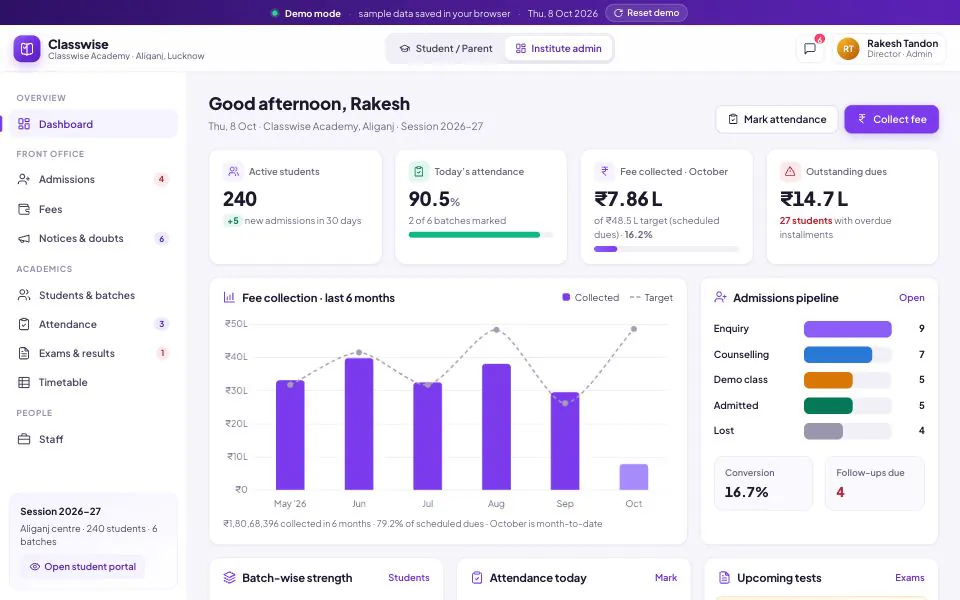
The director’s dashboard: attendance, collections against scheduled dues, defaulters and the admissions funnel on one screen. 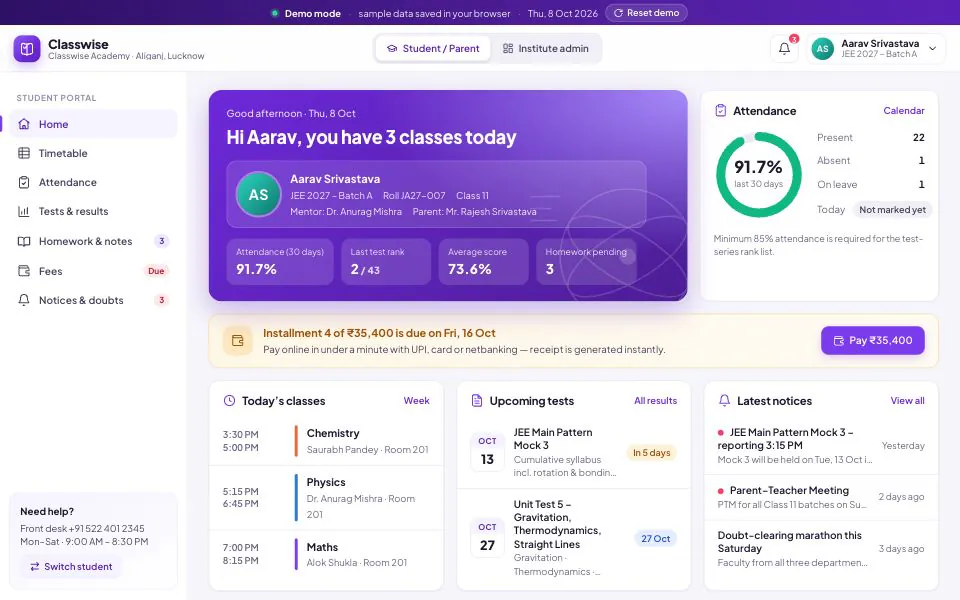
The parent’s view: attendance, rank, the next instalment and today’s classes, from the office’s own records. 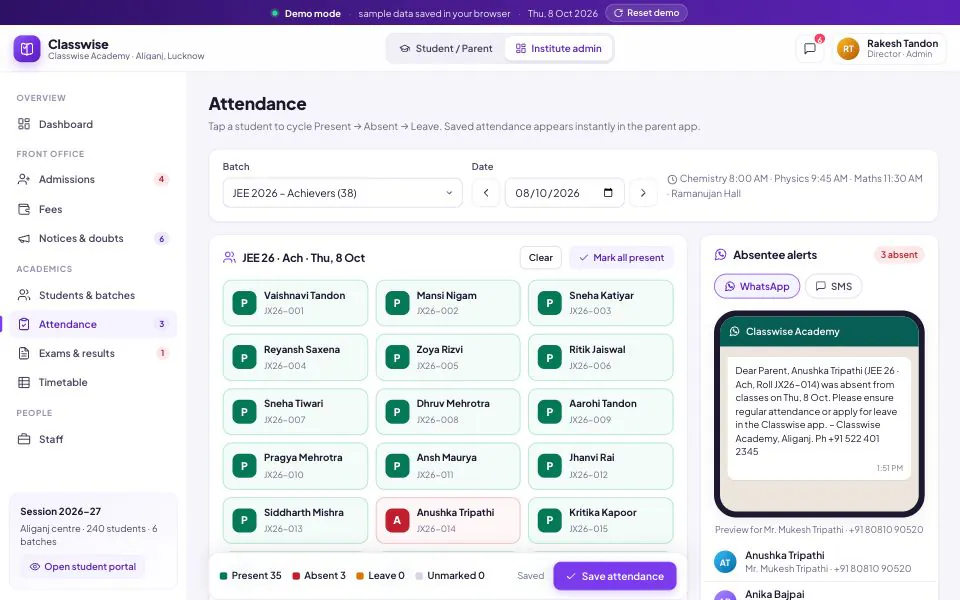
One tap per student; once saved, parents of absent students can be alerted on WhatsApp or SMS.
What the evening rush asks of your software
Between three and eight in the evening, the coaching lanes of Aliganj, Kapoorthala and Indira Nagar run batch after batch. Parents ring the front desk to ask whether their child reached class, and accounts match UPI screenshots against a fee register. If you are comparing coaching institute management software in Lucknow, that evening is the test: attendance marked in a minute, the right parent told, and every rupee tied to a receipt.
Fees take most of the office’s effort. A JEE or NEET batch fee is split into instalments, reduced for scholarship-test results or sibling and merit concessions, and paid in cash, cheque or UPI. Classwise holds each student’s instalment plan, lets parents pay from the app, issues numbered receipts with CGST and SGST shown, and gives accounts a dues list to send reminders from. It is coaching fee management software, not a ledger added later.
Parents care as much about the academic side. Marks go into a grid that totals and ranks as you type, and published results reach the parent app with batch rank, percentile and a subject-wise comparison with the batch average. The timetable flags a teacher booked in two batches at once, and doubts go to the subject teacher in a thread instead of a class WhatsApp group.
Classwise was designed as JEE and NEET coaching management software first, and fits foundation batches, competitive-exam and tuition centres, and small private schools that run on batches and instalments. The demo runs on sample data in your browser: a fictional Aliganj academy with 240 students. A deployment runs on a server with real logins, staff roles and backups, configured for your batches, fee plans and branding.
Who it is for
- JEE, NEET and foundation institutes with several batches a day
- Competitive-exam and tuition centres that collect fees in instalments
- Small private schools that want fees, attendance and report cards together
- Directors who want collections and attendance visible without phoning the office
What Classwise does
Enquiries and admissions pipeline
Enquiries move from first call to counselling, demo class and admission, each with its source and a follow-up date. Converting one creates the student with a batch, an instalment plan and any concession in a single form.
Attendance with parent notification
Faculty tap each student present, absent or on leave, or mark everyone present and change the exceptions. Saved attendance appears in the parent app at once, absentee alerts are one button away, and leave requests are approved alongside.
Fee instalments, concessions and receipts
One-time, two- or four-instalment plans with concessions applied. The counter records cash, UPI with its UTR, cheque or card, and every payment gets a numbered receipt showing CGST and SGST.
Online fee payment from the parent app
Parents see the instalment schedule, pay by UPI, card or netbanking, and download the receipt. The payment lands in the office’s receipt register marked as paid online, beside the counter collections.
Dues list and reminders
Overdue and due-in-15-days views by batch, with amounts, days overdue and the last reminder sent. Remind one guardian or the whole list on WhatsApp or SMS, then collect from the same row.
Tests, ranks and report cards
Set a test for one or more batches on a unit-test, JEE Main, NEET or board pattern. Ranks update as marks are typed, and each student gets batch rank, percentile, subject ranks and a printable report card.
Timetable with clash checks
A weekly timetable per batch. A teacher booked in two batches at once, or overlapping periods in one batch, is flagged and cannot be saved until resolved. Changes reach the student app immediately.
Notices, homework and doubts
Notices go to all students or chosen batches, pinned or also sent on WhatsApp. Homework tracks submissions, notes and DPPs are filed by batch, and students ask doubts that their subject teacher answers in a thread.
In the demo, WhatsApp and SMS messages are previewed and logged but not sent, and online payments are simulated. A deployment uses your own messaging accounts and a payment gateway in your institute’s name.
What changes in your business
- Parents hear about an absence the same day, not at the next PTM
- Every instalment, concession and receipt traceable to one student
- Dues chased before the next instalment falls due
- Ranked results published from the marks grid, not rebuilt in Excel
- Fewer calls to the front desk about timetables, dues and results
- Enquiries followed up on a date instead of forgotten after the first call
Built in and connected
- UPI, card & netbanking via your payment gateway
- WhatsApp Business API
- DLT-registered SMS
- Biometric & RFID attendance devices
- Excel & CSV import and export
- Mobile web app · Play Store app optional
- Your domain, logo & colours
- Cloud hosting with backups
Payment, messaging and hardware integrations are connected during setup, to the providers you already use where possible.
How we set up Classwise for you
- 01
A day at your centre
We sit with the front desk and accounts to see your batches, fee plans, concessions, receipt format and how parents are told things today. Most configuration decisions come out of this day.
- 02
Batches, fee plans and branding
Courses, batches, rooms, timings, instalment schedules and concession types are set up. Receipts and report cards carry your name, address, GSTIN and logo, and the portal runs on your domain.
- 03
Students imported and reconciled
Students, guardians and fees already paid come in from Excel or your current software, and the totals are checked against your fee register before go-live.
- 04
Payments and messaging connected
Your payment gateway for online fees, your WhatsApp Business account and a DLT-registered SMS sender, with message templates approved in your institute’s name.
- 05
One batch first, then the rest
One batch, its teachers and its parents go first, so problems surface with forty students rather than four hundred. Staff are trained at the centre, and the other batches follow.
What we need from you
- Your student list with guardian names and mobile numbers, in whatever Excel shape it is in
- Fee structures, instalment dates and the concessions you actually give
- A current receipt and report card, and your GSTIN if you charge GST
- Batch timetables with the faculty for each subject
- Your logo and domain, plus payment gateway and WhatsApp/SMS accounts if you have them
None of it has to be tidy. Discovering that your data is messier than expected is part of the job, not a reason to delay starting.
Classwise — questions buyers ask
Including what it costs, what it does not do, and who should buy something else.
How much does Classwise cost?
We quote after a short call, because the cost depends on things we cannot see from here: how many centres and batches you run, whether online payments and WhatsApp need connecting, how much data must be imported and in what state, and whether you want a Play Store app on top of the mobile portal. Per-message and per-transaction charges are set by those providers.
Do parents need to install an app, and do they get WhatsApp or SMS alerts?
No install is needed: the parent portal is built for phones, opens in any mobile browser and logs in by mobile number and OTP. A store app in your institute’s name can be added. Alerts go out for absences, dues, receipts and notices. In the demo they are previewed, not sent; live, we connect your WhatsApp Business API account and a DLT-registered SMS sender.
Can parents pay fees online, and does it handle GST receipts?
Yes. Parents pay an instalment by UPI, card or netbanking through your payment gateway; the receipt is generated at once and the payment sits in your register beside cash and cheque collections. Commercial coaching attracts 18% GST, shown on every receipt as CGST and SGST under your GSTIN. Recognised schools’ education services are generally exempt; confirm the treatment for your institute with your CA.
Does it work as school management software for a Lucknow school, or only for coaching?
It suits small private schools that run on similar lines: class sections in place of batches, a period timetable, term tests, report cards and fees in instalments. It does not include UDISE+ or board-portal submissions, transport routing, a library or payroll. A large school with several hundred staff needs a full school ERP, which we would scope separately.
Can we import our existing student and fee data from Excel?
Yes. Send an Excel sheet per batch or an export from your current software, in whatever state it is. We map students, guardians and batches, record what each student has paid against their plan, and reconcile the totals with your accounts before go-live. Student lists and receipts export to CSV at any time, so the data stays yours.
Can it carry our institute’s name, logo and own domain?
Yes. The admin screens, parent app, receipts and report cards carry your institute’s name, logo, address and GSTIN, and the portal runs on your domain, such as app.yourinstitute.in. Fee plans, concession types, test patterns and notice categories are configured to how you work. Changes that need new screens are quoted before we build them.
Does it matter that you are based in Lucknow?
It matters for setup more than for the software. Getting coaching institute management software in Lucknow working is mostly people work: training the front desk, sitting with accounts through the first fee cycle, fixing a batch structure that does not match reality. We do that at your centre. Elsewhere in Uttar Pradesh we work remotely, with planned visits for training and go-live.
Who should not buy Classwise?
A one-teacher tuition class with a few dozen students does not need it; a simple tuition class management app or a well-kept spreadsheet costs less and does enough. Nor is Classwise a learning platform: it does not stream lectures, run proctored online tests or scan OMR sheets. If those matter most, use a dedicated tool and keep Classwise for admissions, attendance and fees.
Other live demos
When you need it built differently
The product is a starting point. These are the services behind it, for when the requirement goes further.
See your own batches in Classwise
Open the demo as the director, then as a parent. Send us your batch list and fee structure, and on a short call we will show your institute in Classwise and quote for setup.