

CA practice management software with an AI assistant built in
TaxPilot AI brings a CA firm's clients, GST, ITR, TDS and audit work, documents, deadlines and fees into one system, with an AI assistant that finds, summarises and drafts from the firm's own records.
- GST, ITR, TDS, audit and ROC in one tracker
- Documents, tasks and fees on every client
- AI proposes, a person approves
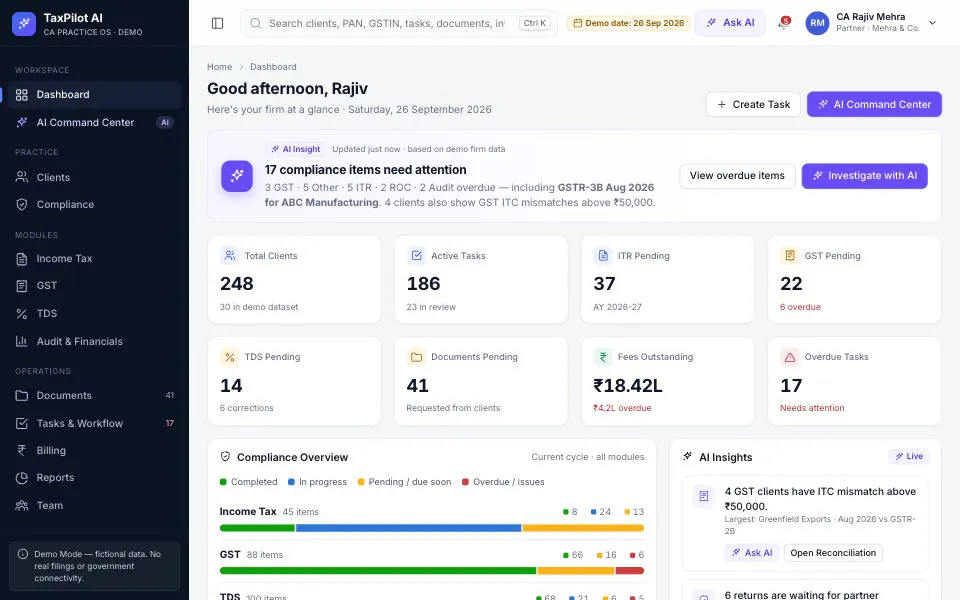
Inside TaxPilot AI
Screens from the live demo, on its sample data. Open the demo to try each one yourself.
The partner's dashboard: what is overdue in every module, and what fees are outstanding. 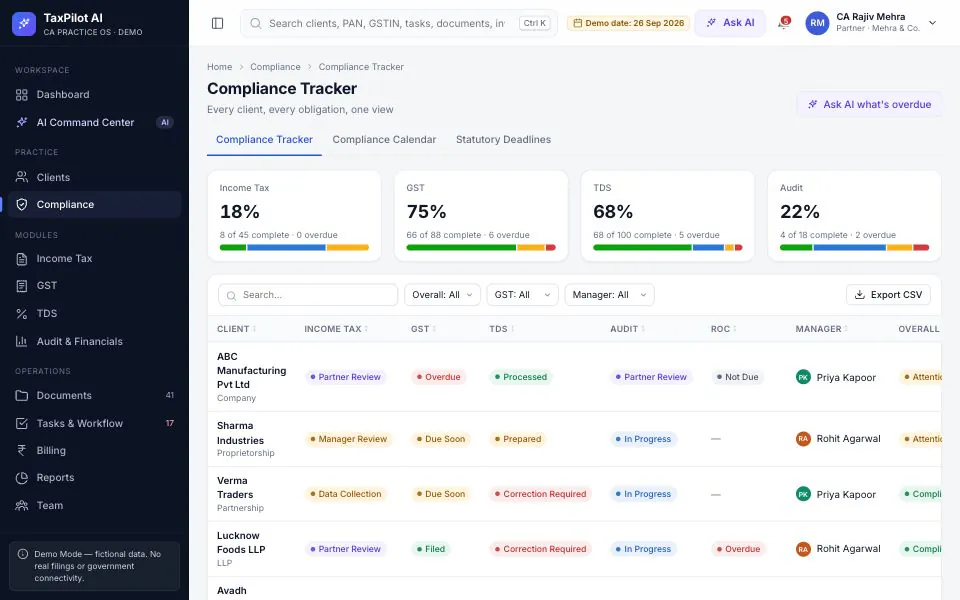
The compliance tracker: every client against every obligation, filterable by status and manager. 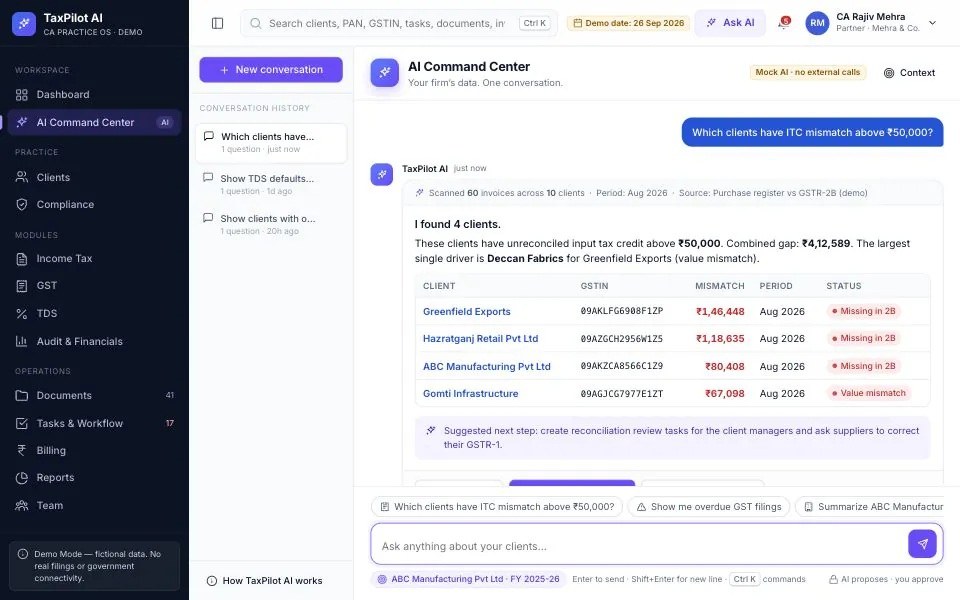
The AI Command Center answers from the firm's own records and suggests review tasks for a person to approve.
Practice management software for chartered accountants who live by due dates
Most CA firms already have good software for preparing a return. What they lack is a view of the practice: which clients still have GSTR-3B pending, whose Form 16 hasn't arrived, which ITRs are waiting for a partner, and which fees have gone past ninety days. That view usually lives in Excel, WhatsApp and someone's memory. CA practice management software exists to hold it; TaxPilot AI is ours, built around Indian compliance rather than a generic task tool.
Each client has one page with PAN, GSTINs, TAN, filings, documents, tasks, financials and fees. Around it sit modules for income tax (ITR preparation, computation, regime comparison, AIS and 26AS, notices), GST (registers, GSTR-1, 3B and 2B, ITC reconciliation, e-invoice and e-way bill records), TDS (challans, matching, returns, defaults) and audit, from trial balance to partner review. A compliance tracker shows every client against GST, ITR, TDS, audit and ROC on one screen.
In the AI Command Center, partners ask in plain English: which clients have ITC mismatches above ₹50,000, which ITRs need partner approval, summarise this client before a meeting. It answers from the firm's records and suggests next steps, such as review tasks, that run only when a person approves. It never files returns or logs in to government portals. In the demo it is a scripted engine in your browser; live, it runs on a language model we set up.
We are a software company in Lucknow, not a CA firm, so we set TaxPilot up with your partners: your services, fees, roles and review steps. For CA firm software in Lucknow that means sessions at your office; other firms work with us remotely. TaxPilot does not connect to the GST, income tax or TRACES portals out of the box. Where an authorised route exists we can scope one; until then, filing stays in the tools you use today.
Who it is for
- CA firms with several partners, staff and articled assistants
- Partners who review and sign off work prepared by others
- Practice managers tracking GST, ITR and TDS across clients
- Firms doing audit and ROC work alongside returns
- Practices moving off Excel trackers and WhatsApp follow-ups
What TaxPilot AI does
Client master and client 360
Individuals, HUFs, proprietorships, partnerships, LLPs, companies and trusts, each with PAN, GSTIN, TAN, CIN, contacts and an assigned manager. One page shows the client's filings, pending documents, open tasks, financials and outstanding fees.
GST compliance tracker for CA firms
GSTR-1 and GSTR-3B status for every GSTIN by period, with overdue returns flagged. Sales and purchase registers, GSTR-2B, ITC reconciliation that marks mismatched, missing and duplicate invoices, RCM, notices, and e-invoice and e-way bill records.
ITR filing tracker and computation
Each client's ITR moves from data collection through preparation, manager and partner review to filed and e-verified. Alongside sit computation, old-versus-new regime comparison, AIS, TIS and 26AS, advance tax, refunds, demands, notices and rectifications.
TDS returns and challan matching
Deductees, transactions and challans for each TAN, with challan matching, quarterly returns, corrections, interest and defaults, so short deductions and unmatched challans show up before the statement is filed.
Audit and financials workspace
Trial balance, ledgers, balance sheet, P&L, cash flow, fixed assets and depreciation, with a tax audit section, audit checklist, working papers, review notes and a partner review step before sign-off.
Document requests and client portal
Request documents from clients, see what is still pending, and keep everything filed against the client. A client portal, simulated in the demo, shows each client their compliance status, pending documents, invoices and messages.
Tasks, deadlines and team workload
Tasks by client and module, a calendar of statutory due dates, a kanban board, recurring workflows, an overdue list and a review queue. The workload view shows who has too much open, and whose items are overdue.
Fee billing and outstanding
A fee master and engagements, invoices with GST at 18% worked out, payments, receipts, outstanding by client and receivables ageing, with payment reminders. Billed against collected shows which clients pay late.
AI assistant across the practice
Ask about clients, filings, documents, tasks or fees in plain language. Answers come with the records behind them and suggested actions, such as review tasks, that run only after a person approves and are logged.
The demo is a fictional firm on sample data held in your browser; it makes no filings and connects to no government system. A deployed TaxPilot runs on a server with individual logins, role-based permissions, an audit log and backups.
What changes in your business
- Overdue returns seen on Monday morning, not when the client calls
- Partners working a review queue, not chasing staff for status
- Document requests tracked until they arrive
- ITC mismatches flagged while there is time to ask the supplier
- Fees billed for the work done, with late payers followed up
- Workload spread before due dates bunch up
- Questions about the practice answered in a sentence, not an export
Built in and connected
- Excel / CSV import
- Tally import (ledgers, trial balance)
- Email reminders
- WhatsApp Business API
- Document storage
- OCR for documents
- Hosted or private LLM
- Role-based access
- Audit log
- PostgreSQL
Payment, messaging and hardware integrations are connected during setup, to the providers you already use where possible.
How we set up TaxPilot AI for you
- 01
Practice walkthrough
A partner and the practice manager take us through client types, services, fees, team roles and how work moves from data collection to sign-off. For a Lucknow firm this happens at your office.
- 02
Import and configuration
Client lists with PAN, GSTIN and TAN come in from Excel or your current software. We set up the team, fee master, each client's recurring compliances, review steps and role permissions, including what the AI may read.
- 03
AI setup and testing
We connect the assistant to the firm's records with permissions applied, choose a hosted or private model with you, and test it on questions your partners actually ask before anyone relies on it.
- 04
Pilot through a real due date
One team runs on TaxPilot through a GST or ITR deadline before the whole firm moves, so gaps show up under real pressure rather than in a training room.
What we need from you
- Client list with PAN, GSTIN, TAN and entity type; Excel is fine
- The services you offer and your fee master
- Team list with roles, and who reviews whose work
- Your current GST, ITR, TDS and audit trackers
- Your policy on where client data may be stored and processed
None of it has to be tidy. Discovering that your data is messier than expected is part of the job, not a reason to delay starting.
TaxPilot AI — questions buyers ask
Including what it costs, what it does not do, and who should buy something else.
How is client data kept secure and confidential?
In a deployed TaxPilot, everyone signs in individually and roles decide which clients and modules they see, so an articled assistant sees only their own work. Every action, AI-assisted or not, is logged, and the AI reads only what the asking user may see. Data is encrypted in transit and backed up, and if it must stay inside the firm, TaxPilot and its AI model can run on your own server.
Does the AI file returns or log in to government portals?
No. TaxPilot is AI software for CA firms that reads the firm's own records to find, summarise and draft: a client summary, a list of ITC mismatches, a document request. Anything it proposes waits for a person's approval. Filing stays with your team and your current tools; a portal connection through an authorised route can be scoped during setup where feasible.
What does CA practice management software like TaxPilot cost?
It depends on the number of users and clients, the modules you need, how much data needs importing and cleaning, whether the AI runs on a hosted model or your own server, and any integrations. Hosting and AI usage are running costs of their own. We quote after a short call with a partner.
Can we import our client list and existing data?
Yes. Client masters usually come from Excel or an export from your current software: name, PAN, GSTIN, TAN, entity type, contacts and assigned manager. Ledgers and trial balances for the audit module can be brought in from Tally exports during setup. We check for duplicate PANs and missing GSTINs before import, so the tracker starts clean.
Does it raise GST invoices for our fees?
Yes. Fee invoices carry the firm's GSTIN with GST at 18%, the rate that applies to CA services, and track paid, part-paid and outstanding amounts with receipts. Fees per service and engagement sit in the fee master, so invoices start from agreed rates. Layout, numbering and branding follow your firm's format.
Can partners use it on a phone?
Yes, in the phone browser. Checking the dashboard, seeing what is overdue or asking the assistant a question between meetings all work on a small screen; preparation work is better done at a desk. If partners want push notifications and approvals in a native app, one can be built on the same backend.
Can it match how our firm works, and do you support firms outside Lucknow?
Yes to both. Statuses, review steps, roles, fee heads, reports and the firm's branding on invoices and the client portal follow your practice, and features can be added. Our office is in Lucknow, so firms here get in-person setup and training. Firms elsewhere in Uttar Pradesh and India are set up remotely, with training visits where useful.
Who is TaxPilot not for?
A sole practitioner with a few dozen ITR clients is well served by a good spreadsheet and their filing software, and TaxPilot does not replace the utility you file with. It earns its place once there are enough clients, staff and due dates that a partner can no longer hold the status in their head.
Other live demos
When you need it built differently
The product is a starting point. These are the services behind it, for when the requirement goes further.
See your practice in TaxPilot
Book a call with a partner or practice manager on it. We will walk through the demo against the due dates you are working to, show what setup would involve for your client base, and quote after that.