

Gym management software in Lucknow, with a member app and a renewals desk
FitNest pairs a member app for classes, personal training, QR check-in and renewals with an owner console for attendance, trainers, leads, GST invoices and WhatsApp renewal reminders.
- Class booking with waitlists
- QR check-in at the front desk
- WhatsApp renewal reminders
Inside FitNest
Screens from the live demo, on its sample data. Open the demo to try each one yourself.
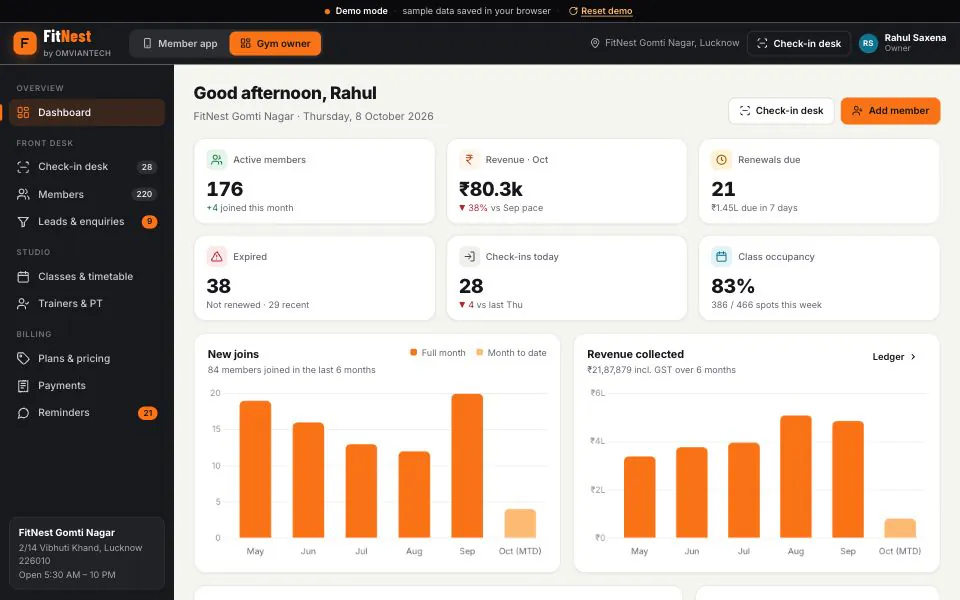
The owner’s dashboard: active members, renewals due, expiries, check-ins and class occupancy, with six months of joins and revenue. 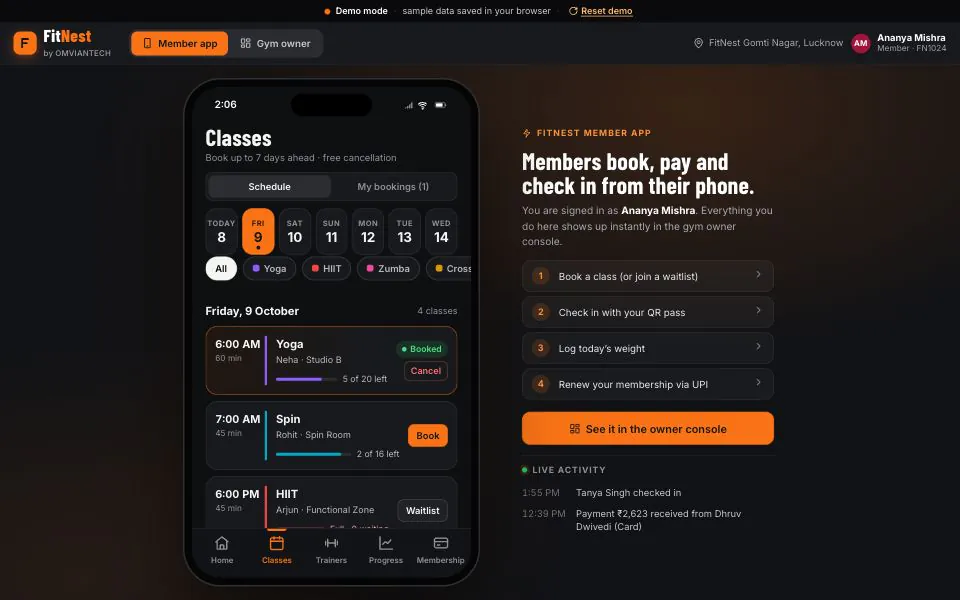
In the member app: book a class, cancel it, or join the waitlist when it is full. 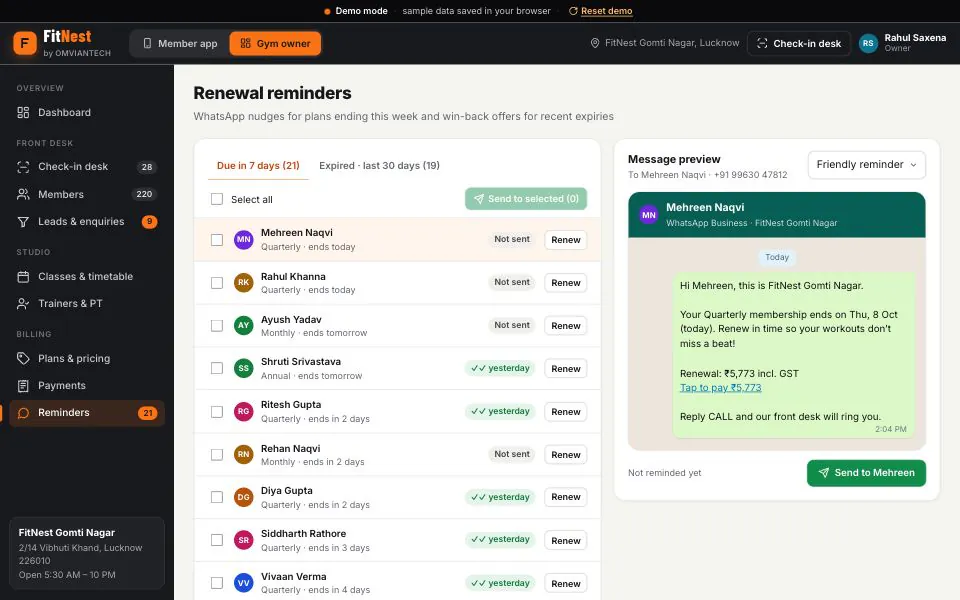
Plans ending this week, each with a WhatsApp renewal message ready to send.
Renewals are where a gym’s month is won or lost
A gym in Gomti Nagar or Aliganj rarely loses members on the gym floor. It loses them at the front desk: plans that quietly ended last week, a renewal call that depends on someone remembering, a trial enquiry from Instagram that never got a reply. The first test for gym management software in Lucknow is what happens to a member whose plan ends on Thursday: who notices, who tells them, and how quickly they can pay.
FitNest puts a member app on every member’s phone. Members book Yoga, HIIT, Zumba, Spin or CrossFit classes up to a week ahead, join a waitlist that moves them in when someone cancels, and book personal training against their PT credits. They check in with a QR pass, log weight and body fat, request a freeze, and renew with a UPI payment and a GST invoice.
Behind it, the owner console is gym membership management software built around one question: is this plan active, ending this week, expired or frozen? The check-in desk stops an expired plan unless you allow a one-time entry. Plans ending this week sit on one screen with a WhatsApp message ready for each member. Leads move from enquiry to trial to member on a board, and trainers’ PT sessions and commission sit beside the timetable.
FitNest suits a busy gym floor as well as a CrossFit box or a Zumba, Pilates or yoga studio that runs on its timetable. Every sale carries 5% GST, the rate for gym and fitness services since 22 September 2025. The demo runs on sample data in your browser, at a fictional Gomti Nagar gym with about 220 members. Deployed for a client, FitNest runs on a server with staff logins, roles and backups, and carries your plans, prices and branding.
Who it is for
- Gyms with a few hundred members and renewals falling all month
- CrossFit boxes and Zumba, spin, Pilates and yoga studios with a timetable
- Owners who sell personal training and pay trainers commission
- Front desks checking members in through the 6 AM and 7 PM rush
- Gyms getting enquiries from Instagram, Google, JustDial and walk-ins
What FitNest does
Member app for classes, PT and renewals
Members see the days left on their plan, book classes and PT, check in with a QR pass, track weight and body fat, follow the day’s workout and renew by UPI, card or net banking.
Fitness studio class booking with waitlists
A weekly timetable with coach, room and capacity for each class. Members book up to seven days ahead; a full class takes a waitlist that fills in order when someone cancels. The desk marks who attended.
QR check-in at the front desk
Members show a daily QR pass, or the desk types an ID, name or phone number. Expired and frozen plans are stopped, with options to renew, unfreeze or allow one entry.
WhatsApp renewal reminders
Plans ending within seven days and those expired in the last thirty are listed with a WhatsApp message each: a friendly reminder, a last-day nudge or a win-back offer, with the amount including GST.
Plans, freezes and GST invoices
Monthly to annual, couple and student plans, each with its own freeze allowance; members request a freeze in the app and the desk approves it. Every sale, renewal and PT pack gets a GST invoice.
Personal training and trainer commission
Each coach’s hours, group classes and PT sessions on one weekly view. PT packs are sold as credits, sessions book only into free slots, and commission is calculated from completed sessions.
Leads and trial pipeline
Enquiries from walk-ins, Instagram, Google or referrals move from new to trial booked, trial done, converted or lost, each with a follow-up date and a WhatsApp follow-up. Converting a lead creates the member.
Owner dashboard and payments ledger
Active members, revenue, renewals due, expiries, check-ins, class occupancy and a peak-hours heatmap. The ledger shows taxable value and GST for every invoice and exports to CSV for your accountant.
In the demo, payments and WhatsApp messages are simulated and the QR scan is a button. In a deployment we connect your payment gateway and WhatsApp Business API number, plus a QR scanner, biometric reader or turnstile where you use one.
What changes in your business
- Every plan ending this week on one list, with a message ready to send
- Expired members stopped at the desk, or let in once on purpose
- Full classes refilled from the waitlist when someone cancels
- A GST invoice for every sale, and the month’s GST in one total
- Trainer commission worked out from completed sessions
- Peak hours visible, so staffing matches demand
Built in and connected
- UPI, cards & net banking via your gateway
- WhatsApp Business API
- QR pass scanning
- Biometric or turnstile devices
- Android & iOS app optional
- A4 & PDF GST invoices
- Excel & CSV import and export
- Your domain, logo & colours
- Cloud hosting with daily backups
Payment, messaging and hardware integrations are connected during setup, to the providers you already use where possible.
How we set up FitNest for you
- 01
An evening rush at your gym
We spend a busy evening at the desk, watching how members check in and how renewals, PT and classes are tracked today.
- 02
Plans, timetable and trainers configured
Plans with prices and freeze rules, PT packs, the class timetable with rooms and capacity, trainers’ hours and commission, and your GSTIN and invoice series.
- 03
Members and expiry dates imported
Members, plans, end dates and PT balances come across from your register, Excel or current software. We check the expiry list with you before any reminder goes out.
- 04
Payments, WhatsApp and the desk connected
Your payment gateway for in-app renewals, your WhatsApp Business API number, and a QR scanner, biometric reader or turnstile at the desk if you use one.
- 05
Desk first, then members
The desk and trainers use FitNest alone for a week; then members get the app link at check-in and on WhatsApp, soonest renewals first.
What we need from you
- Member list with phone numbers, plans and end dates, in whatever form you keep it
- Plans, prices, freeze rules and PT packs as you sell them
- Class timetable with coaches, rooms and capacity
- Trainers’ working hours and commission rates
- GSTIN, plus payment gateway and WhatsApp accounts or a decision to set them up with us
- Logo, colours and the domain for the member app
None of it has to be tidy. Discovering that your data is messier than expected is part of the job, not a reason to delay starting.
FitNest — questions buyers ask
Including what it costs, what it does not do, and who should buy something else.
How much does FitNest cost?
The quote follows a short call. The main factors are branches and staff logins, whether online renewals, WhatsApp and a biometric or turnstile device need connecting, how much member and payment data comes across, changes to plans or screens, and whether you want a branded app in the stores. Payment and WhatsApp providers charge for their own usage.
Do members need to install an app?
No. The member app opens in the phone’s browser from a link, so members can book, check in and renew on day one. A branded app on the Play Store and App Store is built on the same back end and quoted separately. The owner console runs on a laptop or tablet at the desk.
Can we import members from Excel or our current gym software?
Yes. Members, phone numbers, plans, end dates and PT balances come across from Excel, a CSV export or a typed-up register. End dates matter most, so we check the expiry list with you before go-live: the first reminders must reach the right people. Member and payment lists export to CSV at any time.
Does FitNest send WhatsApp renewal reminders?
The Reminders screen lists plans ending within seven days and those expired in the last thirty, each with a WhatsApp message showing the renewal amount with GST. Staff send them singly or in bulk; in the demo, sending is simulated. Live, messages go from your WhatsApp Business API number, and a scheduled daily send can be added.
What GST does the gym billing software charge on memberships and PT?
Gym and fitness centre services attract 5% GST without input tax credit since 22 September 2025, down from 18%. FitNest adds it to every membership, renewal and PT pack, shows CGST and SGST at 2.5% each under your GSTIN, and numbers invoices by financial year. Confirm the treatment for your business with your CA.
Can it carry our gym’s name and work the way we do?
Yes. The member app, invoices and WhatsApp messages carry your gym’s name, logo, colours, address and GSTIN, on your own domain. Plans, freeze rules, PT packs, class types, capacities and commission rates are configured for you. New features, such as diet plans or a second branch, are scoped and quoted before we build them.
Do you set up gym management software in Lucknow on site, and what about gyms elsewhere in UP?
Yes. We are a Lucknow company, so for gyms in the city the desk and trainers are trained on site, ideally across a morning and an evening rush, and we are there for go-live. Gyms elsewhere in Uttar Pradesh are set up remotely, with planned visits for training and launch. Support after that is by phone and WhatsApp.
Who should not buy FitNest?
A neighbourhood gym with fifty members paying cash every month probably does not need it; a register and a phone reminder do the job. FitNest does not stream classes or sync smartwatches either. And it does not open doors by itself: a turnstile or biometric reader has to be connected during setup.
Other live demos
When you need it built differently
The product is a starting point. These are the services behind it, for when the requirement goes further.
Book a class as a member, then chase a renewal
Open FitNest as a member to book a class or show your QR pass, then switch to the owner console to see it arrive and send a renewal reminder. Your member list and plans are all we need to quote after a short call.