

Salon booking software in Lucknow, from the online slot to the GST bill
Glowly gives your salon or spa a booking page with each stylist’s real free slots, and the front desk behind it: calendar, GST checkout, client notes, commission and WhatsApp reminders.
- Live availability for every stylist
- GST invoices with CGST and SGST
- WhatsApp reminders the day before
Inside Glowly
Screens from the live demo, on its sample data. Open the demo to try each one yourself.
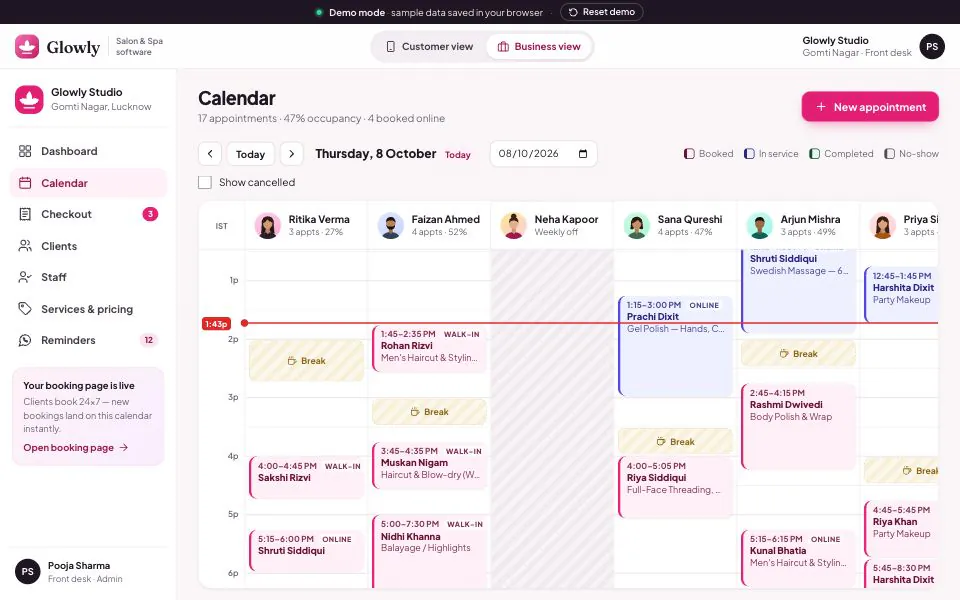
The front-desk calendar: online bookings, walk-ins, breaks and weekly offs for every professional on one day view. 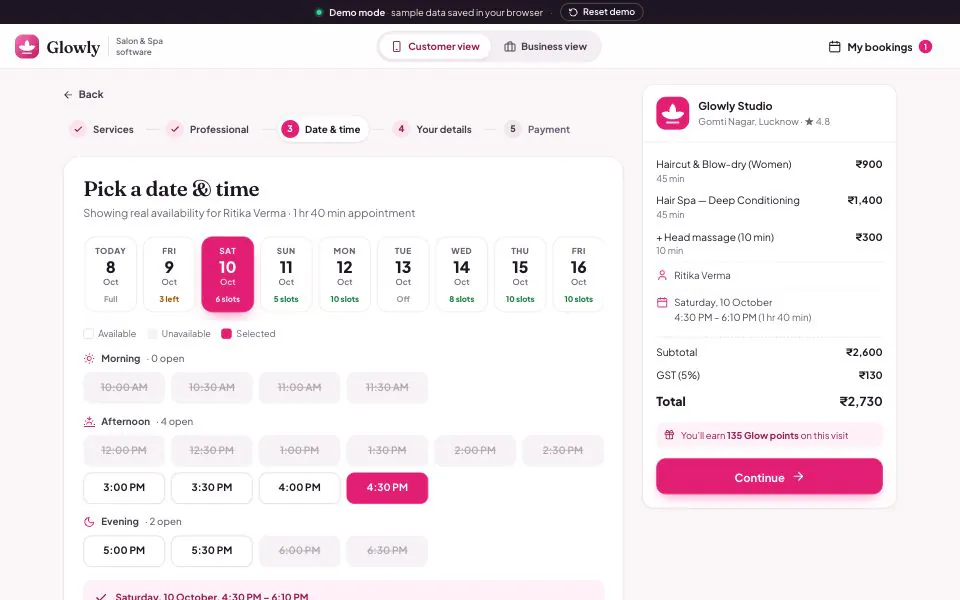
What clients see: only the slots their chosen stylist can actually do, with the price and GST shown before they book. 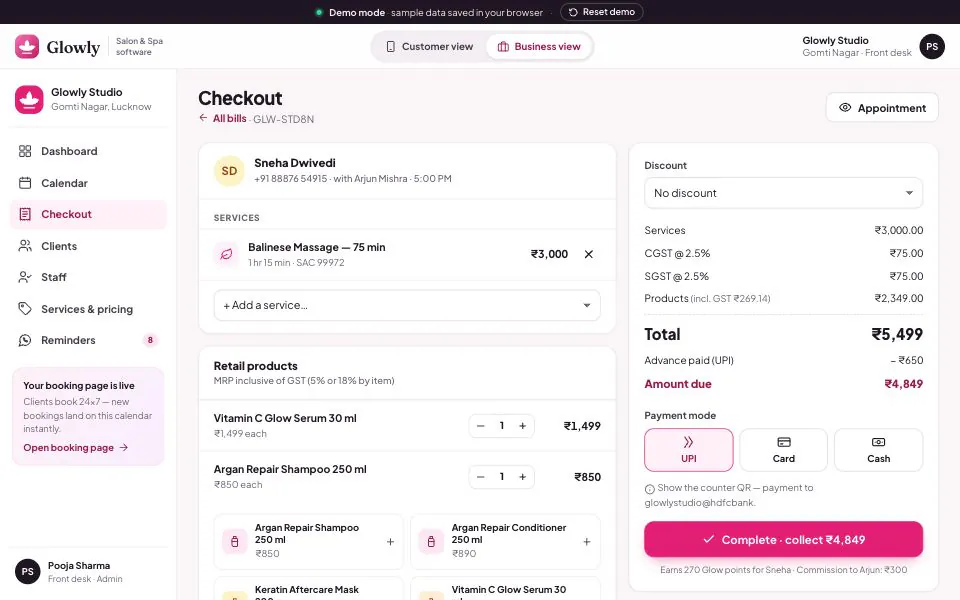
Checkout adds retail products, deducts the online deposit and splits GST into CGST and SGST before the invoice is issued.
Why salons outgrow the appointment diary
On a wedding-season Saturday in Gomti Nagar or Indira Nagar, one person at the front desk answers the phone, the WhatsApp inbox and the client at the door, while a paper diary decides who sits in which chair. Appointments get written twice and a stylist’s break disappears. Good salon booking software in Lucknow has to fix that afternoon first: one calendar per stylist that the booking page, the phone and the walk-in all write to.
Glowly’s booking page shows your services, prices and each professional’s free slots for the next two weeks, worked out from their shift, break and weekly off and the length of what the client picked. Clients choose a favourite stylist or “any professional”, pay a small deposit by UPI or card, or pay at the salon, and reschedule or cancel from their own bookings page. It opens in a phone browser, with nothing to install.
Behind the page is the salon management software your staff use all day. Reception sees allergy and preference notes at check-in. Checkout adds retail products, applies a membership or festive discount, deducts the deposit and splits GST into CGST and SGST. Salon and spa services attract 5% GST without input tax credit since 22 September 2025, and the same bill works for a ladies’ beauty parlour, a men’s grooming studio or a unisex salon.
The demo runs on sample data in your browser: a fictional Vibhuti Khand studio with six professionals, 34 services and three membership tiers, with a switch between the client’s view and the salon’s. Nothing you do there is sent anywhere. A deployment runs on a server with real staff logins, roles and backups, set up with your services, prices, team and branding, and connected to a payment gateway and WhatsApp Business number in your salon’s name.
Who it is for
- Hair and beauty salons with three or more chairs and a full weekend
- Unisex salons and men’s grooming studios mixing walk-ins with bookings
- Spas booking therapists for 60- and 90-minute treatments
- Bridal studios that want a deposit before blocking a morning
- Owners who want takings and commission without a day-end register
What Glowly does
Online booking with real stylist availability
Clients pick services, a professional or “any available”, and a slot in the next 14 days. Slots follow each stylist’s shift, break, weekly off and existing bookings, so a taken time is never offered.
Front-desk calendar, one column per stylist
Breaks, weekly offs and a live now-line on one day view. Click an empty slot to add a walk-in or phone booking; click an appointment to check in, reschedule, mark a no-show or bill it.
Deposits by UPI to hold the slot
Online bookings take a small deposit by UPI QR or card, or the client chooses to pay at the salon. The deposit comes off the bill at checkout, and top-tier members book without one.
Salon checkout with GST invoices
Add services and retail products, apply membership, goodwill or flat discounts, and deduct the advance. CGST and SGST show at 2.5% each, and invoices are numbered by financial year, then printed or sent on WhatsApp.
Client notes at check-in
Visit history, lifetime spend and points for every client. Notes such as “allergic to ammonia, patch test first” appear on the appointment and at checkout, where whoever does the service will see them.
Memberships, coupons and loyalty points
Yearly memberships take a percentage off every service, applied by themselves online and at checkout. Coupons can be limited to first visits or weekdays, and every bill earns points.
Staff schedules and commission
Set each professional’s shift, break, weekly off and the services they perform, and online availability changes at once. Commission is worked out on service sales after discounts and before GST.
WhatsApp reminders the day before
Tomorrow’s appointments are listed with each message filled in from your template: name, time, stylist and services. Send them one by one, all together, or switch on an automatic send every morning at 10.
In the demo, payments, WhatsApp reminders and invoice sharing are simulated, and nothing leaves your browser. In a deployment we connect a payment gateway and a WhatsApp Business API number in your salon’s name.
What changes in your business
- Bookings taken at night and on Sundays without anyone answering the phone
- No double-booked chairs: booking page, phone and walk-ins share one calendar
- Fewer no-shows, because reminders go out the day before and online slots carry a deposit
- A GST invoice for every visit, numbered by financial year
- Allergy notes seen by whoever does the service
- Commission and day-end takings worked out from the bills
Built in and connected
- UPI QR (any UPI app)
- Razorpay, PhonePe or your own payment gateway
- WhatsApp Business API
- A4 & thermal invoice printing
- Calendar invites (.ics) for clients
- Android & iOS app optional
- Excel & CSV client import
- Your domain, logo & colours
- Cloud hosting with daily backups
Payment, messaging and hardware integrations are connected during setup, to the providers you already use where possible.
How we set up Glowly for you
- 01
A morning at your salon
We watch a real shift at the desk: how bookings arrive, how walk-ins are fitted in, and how bills and commission are worked out today.
- 02
Services, staff and branding set up
Services with prices and durations, each professional’s hours and skills, your memberships and coupons, and your logo, GSTIN and invoice series.
- 03
Clients and memberships imported
Names, numbers, notes and active memberships come across from Excel or your current software, so regulars are recognised by phone number from day one.
- 04
Payments and WhatsApp connected
Your payment gateway for deposits and your WhatsApp Business API number for reminders and invoices, with templates approved in your salon’s name.
- 05
Go live on a quiet weekday
Staff are trained before the first busy weekend, and the booking link goes on your Instagram bio and Google Business Profile.
What we need from you
- Your service menu with prices, durations and who does what
- Staff shifts, weekly offs and commission rates
- Your client list, in whatever form it exists today
- GSTIN, invoice format, and the discounts and memberships you give
- Payment gateway and WhatsApp Business accounts, or a decision to set them up with us
- Logo, colours and the domain for the booking page
None of it has to be tidy. Discovering that your data is messier than expected is part of the job, not a reason to delay starting.
Glowly — questions buyers ask
Including what it costs, what it does not do, and who should buy something else.
How much does Glowly cost?
We quote after a short call. The cost depends on how many branches and staff logins you need, whether deposits and WhatsApp are connected, how much client data comes across, how much is customised, and whether you want a branded Android or iOS app. Payment gateway and WhatsApp charges are billed by those providers directly.
Is there a salon appointment booking app for clients?
Clients book from a link that opens a booking page built for phones, so there is nothing to install; share it on Instagram, Google and WhatsApp. Staff screens work on a laptop or tablet at the desk. Your own app on the Play Store and App Store can be built on the same system and quoted separately.
Does the salon software send WhatsApp reminders?
Yes. The Reminders screen lists tomorrow’s appointments with each message filled in from your template, to send one at a time, all at once, or automatically every morning. In the demo the sending is simulated. Live, messages go from your WhatsApp Business API number, using templates approved by Meta in your salon’s name.
Does it work as beauty parlour billing software, with GST invoices?
Yes. Salon and spa services attract 5% GST without input tax credit since 22 September 2025, and each invoice shows CGST and SGST at 2.5% each under your GSTIN. Retail products are listed separately with GST included. A salon not registered for GST can issue bills without tax. Your CA should confirm the treatment for your business.
Can we bring our client list across from Excel or another salon software?
Yes. Send an Excel sheet, a CSV export from your current software, or a register to type up, which we quote separately. Names, numbers, notes and active memberships come across, plus past visit totals if your system exports them. Clients are matched by mobile number, so a regular booking online for the first time is recognised.
Can it carry our salon’s name, and can you change how it works?
The booking page, invoices and messages carry your salon’s name, logo, colours, address and GSTIN, on your own domain. Services, memberships, coupons, deposit rules and commission rates are configured for you. Changes that need new screens, such as package redemption, are scoped and quoted before we build them.
Do you set up salon booking software in Lucknow in person, and what about the rest of UP?
We are based in Lucknow, so for salons in the city, setup and staff training happen at the salon, on a weekday before your first busy weekend. Salons elsewhere in Uttar Pradesh are configured remotely, with planned visits for training and go-live. Support after that is by phone and WhatsApp.
Who should not buy Glowly?
A one- or two-chair parlour where the owner takes every booking personally will not get its money back; a free booking app does enough. Glowly works as spa management software for therapists’ time, but it books people, not rooms, so a day spa scheduling treatment rooms needs that added. It also bills retail products without tracking their stock.
Other live demos
When you need it built differently
The product is a starting point. These are the services behind it, for when the requirement goes further.
Book a haircut in the demo, then bill it
Open Glowly as a client and book a service, then switch to the business view to check it in, bill it and send tomorrow’s reminders. Then send us your service menu and staff list for a short call and a quote.