
QR code ordering system for restaurants that serve guests in their cars
OrderMe (DriveDine in the demo) lets guests scan a QR at their parking spot, mark their car on a map, and order and pay without getting out. Kitchen, waiters and owner each get their own screen; the demo is a working prototype on sample data.
- Car pinned on a map, inside your ordering radius
- Guest, kitchen, waiter and owner screens
- Runs in the browser: guests install nothing
Inside OrderMe · DriveDine
Screens from the live demo, on its sample data. Open the demo to try each one yourself.
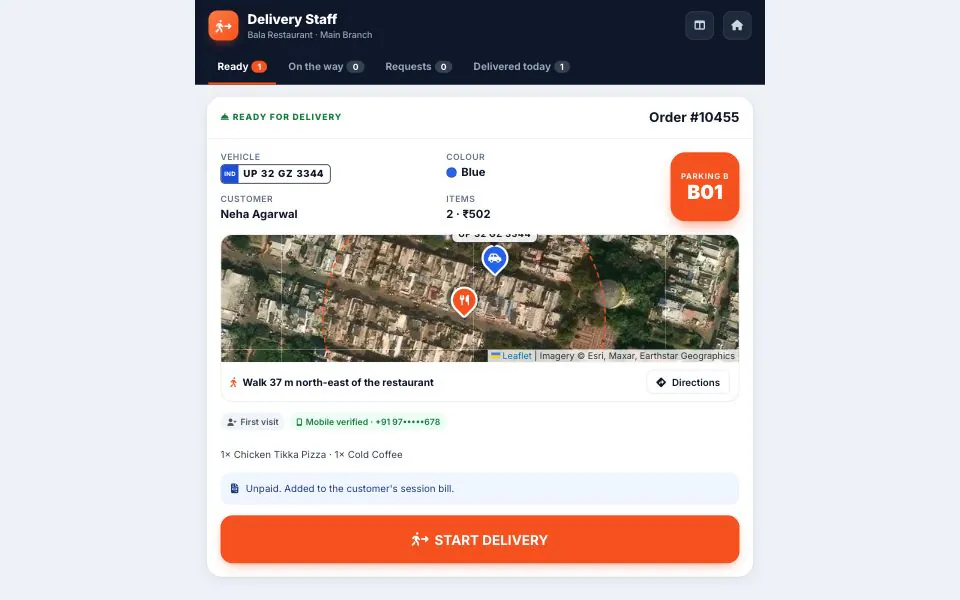
The waiter sees where the car is, which plate to look for and any cash due. 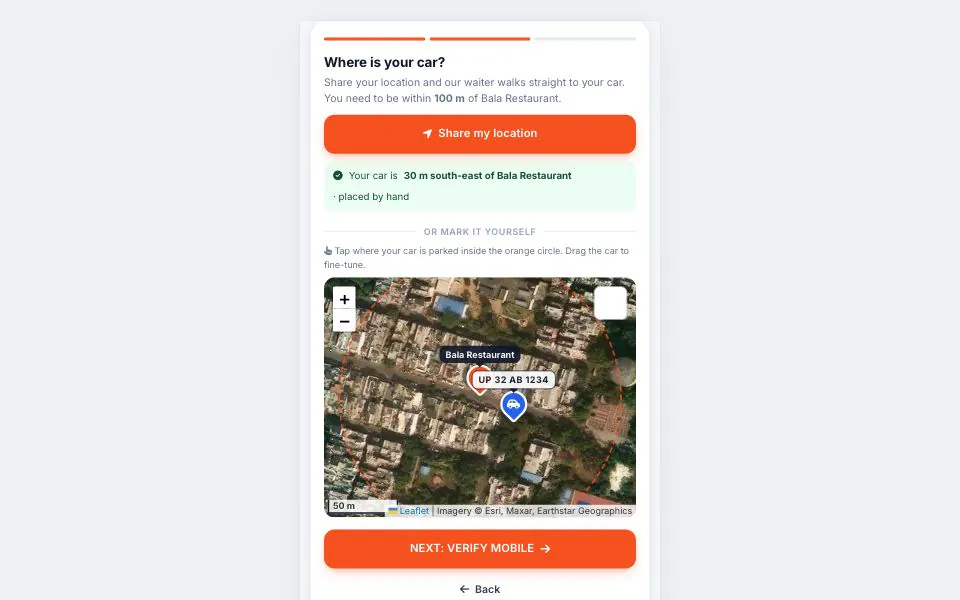
Guests mark their car on the map, inside the restaurant’s ordering radius. 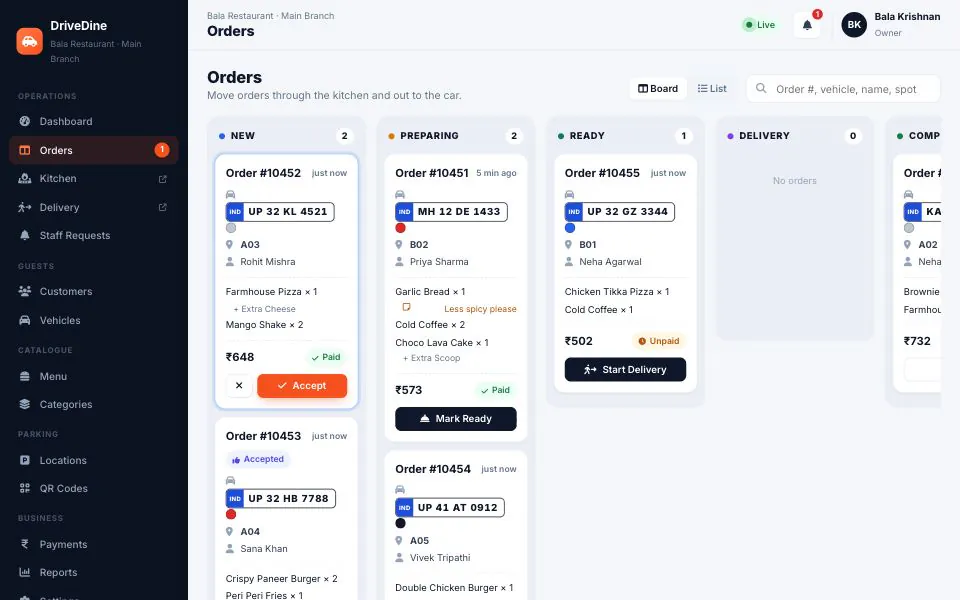
The owner’s order board follows every car from new order to delivered.
The table is a car
A QR code ordering system for restaurants usually assumes a table number. At a drive-in, a highway dhaba or a café with a parking lot, the table is a car, and cars park wherever there is space. Someone crosses the lot with a tray looking for ‘the white Swift’, an order called through a window reaches the wrong car, and nobody is sure who has paid. Order-to-car or curbside service has to know which car ordered, where it is and what is owed.
OrderMe starts with a QR sign at each parking spot, or your restaurant on a map. The guest enters their name, mobile number and vehicle number, then marks the car by sharing their phone’s location or tapping where they are parked on a satellite view. The pin must sit inside your ordering radius, set between 50 and 100 metres per restaurant and checked during ordering, so every order arrives with a spot the waiter can walk to.
From there it works like any contactless ordering system for restaurants: categories, veg markers, add-ons, kitchen notes and a coupon code. Guests pay by UPI or card, choose cash at the car, or add the order to a running bill settled before they leave. The kitchen display shows big tickets, and the waiter’s phone shows the car on a small map with directions such as ‘walk 37 m north-east’.
At the car, staff tick that the plate matches and photograph the hand-over, and the guest confirms they got their food. The demo is a working prototype on sample data in your browser, with three fictional restaurants around Lucknow on OpenStreetMap and satellite tiles. A production deployment runs on a server with real logins and backups, uses a commercial map tile provider, and repeats the car-location check on the server.
Who it is for
- Drive-in restaurants where guests eat in their cars
- Highway dhabas with cars pulling in off the road
- Cafés and quick-service outlets with a parking lot or kerbside
- Cloud-kitchen pickup points handing food to waiting cars
- Owners running several outlets who want one console
What OrderMe · DriveDine does
A QR code for every parking spot
Each spot gets its own QR poster, ready to print, so restaurant QR menu ordering opens at the right spot. Regenerating a code retires the old poster. Guests without a spot QR find you on a map.
Car pin inside your ordering radius
Guests share their location or tap their car on a satellite map, then drag the pin to fine-tune it or move it if they re-park. It has to fall inside the restaurant’s circle before they can order.
Menu, add-ons and a running bill
Categories, veg markers, add-ons and kitchen notes. Guests can order again during the same visit, and everything rolls into one session bill with GST, discount and balance, paid once at the end if they prefer.
Contactless ordering and payment
UPI, card, cash at the car, or add to bill. Payment is simulated in the demo; in production your gateway is connected, paid orders arrive marked paid, and cash orders show what to collect.
Kitchen display
Large tickets with spot, plate and items, and one big button for the next step: accept, start preparing, mark ready. Tickets turn red after the target prep time you set.
Waiter app that leads to the car
Each ready order shows a mini map from the restaurant to the car, directions in plain words, the plate and colour, and any cash to collect. The waiter ticks the plate and photographs the hand-over.
Call Staff from the car
Guests tap a button for water, cutlery, napkins, payment help or the bill. Requests pop up on the dashboard to acknowledge and resolve, and a report tracks response times.
Owner dashboard and reports
Live order board, car map, customers and vehicles with visit history, menu and stock switches, payments, and reports on sales, products, customers, vehicles and staff requests, exportable to CSV.
Console for several outlets
Place each restaurant on the map, set its radius, create and share owner logins, suspend an outlet and see every outlet’s daily sales. Each owner sees only their own restaurant’s data.
If the plate does not match, staff report it and the guest is asked to confirm their car; if the guest taps ‘Not received’, the restaurant is alerted. The demo’s one-time password is fixed at 1234; a deployment sends a real OTP by SMS.
What changes in your business
- Waiters walk to the right car instead of searching the lot
- Orders reach the kitchen as tickets, not shouted through a window
- Every order marked paid, cash due or on the bill
- Repeat guests recognised by mobile number and vehicle
- Sales by day, hour, product and parking spot without a register
- A plate check and photo behind every hand-over
Built in and connected
- UPI and card gateway (Razorpay, PayU or Cashfree)
- SMS OTP provider
- Leaflet maps with MapTiler, Stadia or Mapbox tiles
- Printable QR posters per spot
- Kitchen printer or POS sync, on request
- Cloud hosting with daily backups
Payment, messaging and hardware integrations are connected during setup, to the providers you already use where possible.
How we set up OrderMe · DriveDine for you
- 01
Look at the lot
We go over your parking layout, where food leaves the kitchen and how many cars arrive at peak, then fix zones, spot codes and the ordering radius. In Lucknow we visit; elsewhere we work from photos and a video call.
- 02
Menu, spots and settings
Menu, add-ons, prices, tax rate, prep-time target and coupons loaded, and a QR poster printed for each spot, placed where a driver can scan it.
- 03
Payments, OTP and maps
Your payment gateway, an SMS provider for one-time passwords and a commercial map tile account connected, with the car-location check running on the server.
- 04
Trial service and training
Kitchen, waiters and cashier trained on their own screens, then a trial on a quieter day before the first busy evening.
What we need from you
- Menu with prices, categories, veg or non-veg, and add-ons
- A photo or sketch of the parking area, with any numbered spots
- GSTIN, tax rate and the details printed on your bill today
- A payment gateway account, or the documents to open one
- How many kitchen screens and waiter phones you will use
- Your logo, colours and domain
None of it has to be tidy. Discovering that your data is messier than expected is part of the job, not a reason to delay starting.
OrderMe · DriveDine — questions buyers ask
Including what it costs, what it does not do, and who should buy something else.
Do customers need to install an app?
No. OrderMe is web-based: the QR code or map link opens the menu in the phone’s browser. That matters more for a drive-in or dhaba ordering app than for a café, because most guests order once and drive on. Staff screens, from the kitchen display to the waiter app and owner dashboard, also run in a browser on a tablet, phone or counter PC.
How accurate is the car location?
As accurate as the guest’s phone, and phone GPS can be off by several metres, more under a roof or between buildings. So the pin is a starting point: guests drag it onto their car, and staff also see the plate, colour and spot code. The radius is checked when the guest signs in and when they move the pin; in production the server repeats that check.
What does a QR code ordering system for restaurants like this cost?
It depends on the number of outlets and parking spots, which screens you need, the payment gateway and SMS provider, map tile usage, any connection to your POS or accounts, and whether we host it. We quote after a short call about how your lot and kitchen run, not from a price list.
Can we give guests a GST bill?
Each order and the visit’s bill show GST at the rate you set, with your GSTIN printed on the bill, and reports total the tax collected each day. The demo does not produce a formal tax invoice with HSN or SAC lines. If you need one, or need orders pushed into your billing or POS software, we set that up during customisation.
Can we load our existing menu?
Yes. Send it as Excel, a PDF or photos of the printed card, and we load categories, items, prices, veg markers and add-ons. After that the owner edits it from the Menu screen, including marking items out of stock mid-service. Parking zones and spots are set up the same way, each with its own QR poster.
Can it carry our brand and our way of working?
Yes. Your name, logo, colours and photos go on the guest screens and QR posters, on your own domain or sub-domain. Ordering radius, prep-time target, coupon, tax rate and auto-accept are settings the owner changes. Larger changes, such as table ordering inside the restaurant alongside car orders, or a loyalty scheme, are customisation we scope and quote.
Do you support restaurants outside Lucknow?
Yes. We are in Lucknow, so restaurant ordering software in Lucknow comes with an on-site look at your lot, QR signs placed with you, and the kitchen and waiters trained in person. Drive-ins and dhabas elsewhere in Uttar Pradesh, including highway sites, get remote setup with a planned visit for go-live, then support by phone and remote session.
Who is OrderMe not for?
A dine-in restaurant where every guest sits at a numbered table is better served by a standard table-QR menu or its POS vendor’s ordering module; the car pin would add a step nobody needs. OrderMe does not do home delivery, so it does not replace Swiggy or Zomato. And if your lot has no usable mobile signal, fix that first.
Other live demos
When you need it built differently
The product is a starting point. These are the services behind it, for when the requirement goes further.
Order from a car on the demo, then follow it out of the kitchen
Pin a car and place an order in the guest view, with the kitchen display and waiter app open in other tabs; they update live. If it fits, send us your menu and a photo of your parking and we will plan the setup with you.