

Field service management software in Lucknow for install and service teams
OpsDesk puts task allocation, site visits with photo evidence, material movement and an SLA service desk in one system, for companies that install and maintain equipment at client sites. The demo is the working product on sample data, with five roles to switch between.
- Work approved against photo evidence
- A material ledger that reconciles
- SLA clocks that pause while you wait on the client
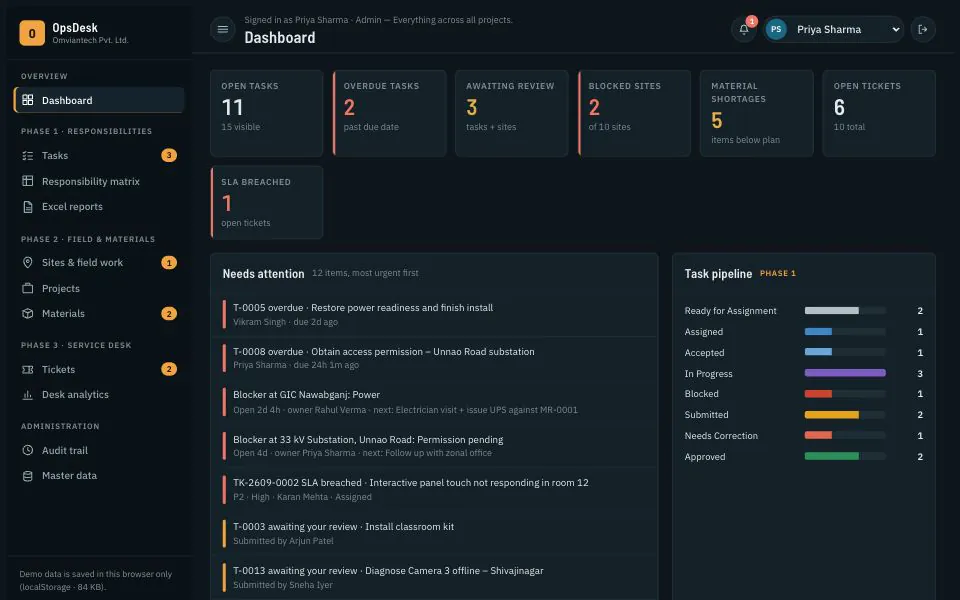
Inside OpsDesk
Screens from the live demo, on its sample data. Open the demo to try each one yourself.
The dashboard puts overdue tasks, open blockers and SLA breaches first. 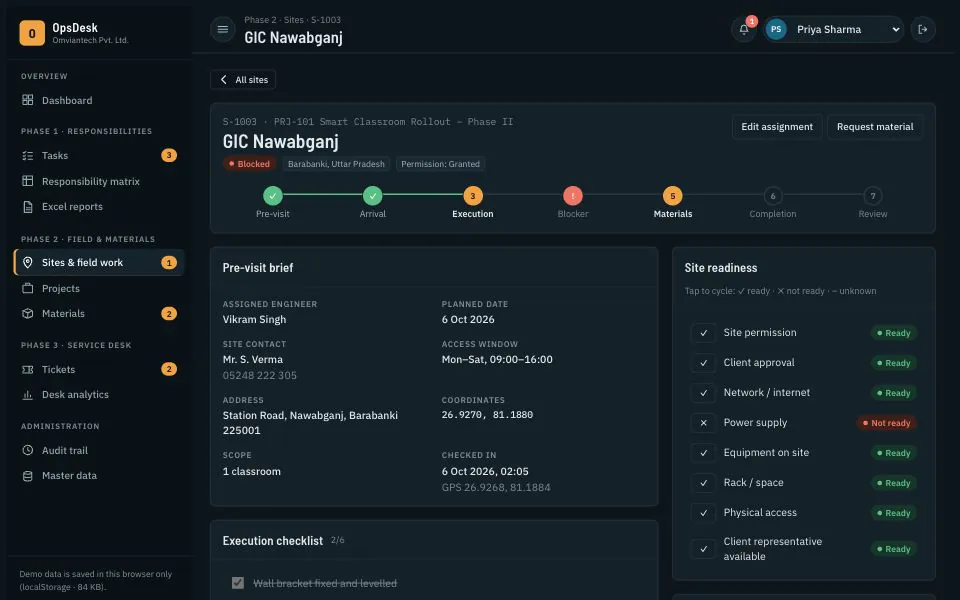
A site record: pre-visit brief, check-in, readiness and the blocker holding it up. 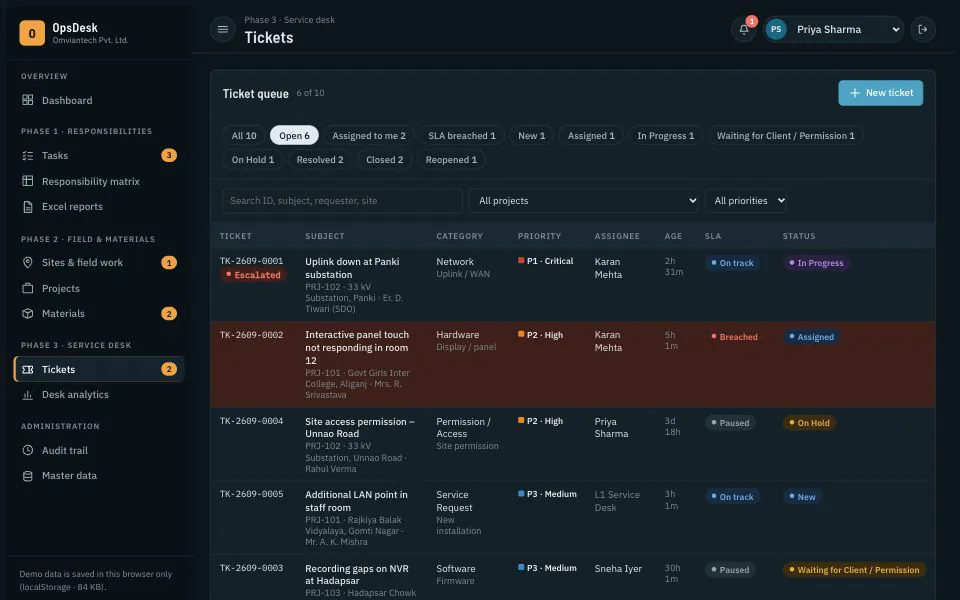
The service desk queue, sorted by priority, with SLA state on every ticket.
Where field work goes missing
A CCTV integrator with forty junctions to commission, a solar installer working through rooftops, a telecom contractor with a crew at a substation: the work happens far from the office, which hears about it on WhatsApp. Photos sit in a group chat, material leaves the store on a paper slip, and the client’s complaint lives in someone’s inbox. When you compare field service management software in Lucknow or elsewhere, ask whether a team lead can answer three questions without a phone call: who owns this job, what is blocking it, and where did the material go?
OpsDesk is organised in three phases. Phase 1 is responsibility: every task has one accountable owner, a team lead, a due date, a checklist and completion criteria. Work moves from assigned to accepted, in progress and submitted, then approved or returned for correction, and a task cannot be submitted until its checklist is done and evidence photos are attached. Every decision lands in an audit trail and in Excel reports a client can read.
Phase 2 is the field. Each site carries a pre-visit brief with contact, access window and coordinates, an eight-point readiness check from site permission to power and rack space, a check-in time with optional GPS, an execution checklist, and blockers with an owner and a next action. Material follows its own path: request, team-lead review, store verification, issue, receipt at site, then consumption, return or damage. Stock balances are derived from that movement ledger rather than typed in, so they reconcile.
Phase 3 is the service desk: tickets by category and queue, P1 to P4 priorities with response and resolution targets, escalation, resolution codes and reopen tracking. The demo runs in your browser on sample data, with fictional projects for a classroom rollout, a substation uplink and junction CCTV. A deployment runs on a server with real accounts, role permissions, photo storage and backups, configured for your projects and contracts.
Who it is for
- IT, CCTV and networking integrators with engineers at client sites
- Solar, electrical and telecom contractors running multi-site projects
- Facility management firms handling maintenance calls under SLA
- Team leads who review work and answer to the client
- Admins and store-keepers who issue and reconcile material
What OpsDesk does
Field engineer task management
Tasks with an owner, team lead, priority, due date, dependencies, checklist and completion criteria. Assignment ranks engineers by region, skills and open workload, and the lead can override. Engineers accept, start, report blockers and submit from their phone.
Photo evidence task checklist
Photos are tagged arrival, before, after, installation, test result, document or blocker, with uploader and time. A site cannot be submitted without arrival, before and after photos, a complete checklist and no open blockers.
Review, correction and escalation
Team leads approve submitted work or return it with remarks, and can escalate a site to the project manager. Decisions stay on the record, so ‘it was done’ is checked against photos, serial numbers and test results.
Site visit tracking with readiness and blockers
Work notes, serial numbers and test results are recorded per site, alongside the readiness check and check-in time. Blockers carry a category, owner, age and next action until someone resolves them.
Material request and GRN tracking
Requests go from engineer to team lead to store, can be partly approved, then are issued, received and consumed or returned. Receipts, issues, consumption, returns and damage form one ledger; stock shows planned, in store, reserved, on field and shortage per project.
Service desk ticketing with SLA
P1 to P4 priorities with response and resolution targets, clocks that pause on hold or while waiting for the client, at-risk and breached flags, escalation, linked tasks, resolution codes and internal notes requesters never see.
Excel reports with photos
Nine report types, from the task register and site-wise field report to stock, blocker and ticket registers, filtered by project, site, district, owner or date. Export to Excel with secure photo links or thumbnails, or to CSV.
Roles, permissions and audit trail
Admin, team lead, technical support, field engineer and project manager each see their own menus, projects and actions; engineers see only their own sites. Every status change, review, stock movement and report goes into the audit trail.
Bulk site import
Paste or upload rows from the site template. Each row is checked for duplicate codes, unknown projects, invalid dates and engineer IDs; only clean rows are imported, with errors shown per row.
Two things the demo shows but cannot do on its own: report schedules are saved and can be run, but emailing them needs the deployed server; and notifications appear inside OpsDesk only. Email, SMS or WhatsApp alerts are connected during setup.
What changes in your business
- One accountable owner for every task, visible to the whole team
- Work approved against photos and serial numbers, not a phone call
- Blocked sites surface with an owner and a next action
- Material balances that reconcile from receipt to consumption
- At-risk tickets flagged before they breach the SLA
- Client progress reports in Excel without a weekend of copy-paste
Built in and connected
- Excel (.xlsx) and CSV export
- Email for scheduled reports
- WhatsApp Business API or SMS alerts
- Cloud storage for site photos
- Cloud or on-premise server with daily backups
Payment, messaging and hardware integrations are connected during setup, to the providers you already use where possible.
How we set up OpsDesk for you
- 01
Map your workflow
We go through how a job moves today, from purchase order to handover, and map your roles, statuses, checklists, readiness items and SLA targets onto OpsDesk.
- 02
Masters and import
Users, regions, skills, projects, materials and stores set up; sites imported from your Excel sheets with row-by-row validation.
- 03
Pilot on one project
One live project runs on OpsDesk with a few engineers, so checklists and photo rules are tested in the field before a wider rollout.
- 04
Rollout, training and support
Engineers trained on their phones, leads on review and reports, store staff on the ledger. In Lucknow we train on site; elsewhere remotely, with planned visits.
What we need from you
- The Excel trackers, registers or forms you use today
- Roles, and who approves what on each project
- Site list with codes, districts, contacts and assigned engineers
- Material list with units, stores and which items are serial-tracked
- SLA commitments by priority, from your client contracts
- A sample of the reports your clients expect
None of it has to be tidy. Discovering that your data is messier than expected is part of the job, not a reason to delay starting.
OpsDesk — questions buyers ask
Including what it costs, what it does not do, and who should buy something else.
Does it work where the network is weak?
Partly. Photos are resized on the phone before they are saved, which helps on a slow connection. But the demo has no offline mode: with no signal at all, an engineer cannot submit until they reach coverage. If your sites are often out of range, we can build offline capture that syncs later as part of the deployment; tell us at the start, because it changes the design.
Is there a mobile app for field engineers?
Engineers use OpsDesk in the phone’s browser, where the layout adapts to a small screen. From site they can check in, tick checklists, take photos with the camera, report blockers and raise material requests, with nothing to install. If you manage company phones and want a packaged Android app, we can wrap it as part of the deployment.
What does it cost?
It depends on the number of users and roles, how many projects and sites run at once, how far your workflow differs from the demo, the reports your clients expect, photo storage, connections such as email, WhatsApp or your ERP, and whether we host it or you do. We quote after a short call and a look at the trackers you use today.
Can we import our existing sites and data?
Yes. Sites come in through the CSV template with row-by-row validation, and we load users, projects, materials, opening stock and open tickets from your current sheets during setup. Old photos and closed jobs can come across as history if clients audit them; we agree what is worth migrating before we start.
Can we change the workflow, fields and branding?
Yes. Statuses, checklists, readiness items, blocker categories, ticket queues, SLA targets and report columns are configured for your company, and each project has its own checklist. Your name and logo go on the screens and Excel exports. New modules, such as client sign-off on a phone or AMC contract tracking, are customisation we scope and quote.
How do the SLA clocks work?
Each priority has a response and a resolution target; the demo’s defaults run from one hour and four hours for P1 to one day and five days for P4. The resolution clock pauses while a ticket waits for the client or is on hold, tickets show as at risk at 75% of the target, and breaches show on the dashboard. Targets are settings, matched to your contracts.
Do you support teams outside Lucknow?
Yes. We are based in Lucknow, so field service management software in Lucknow can be set up with your team in the room and engineers trained on site. Teams elsewhere in Uttar Pradesh and across India are set up remotely, with planned visits for kick-off and go-live, and supported by phone and remote session after that.
Who is OpsDesk not for?
A team of two or three engineers taking jobs by phone will find it more structure than they need; a shared sheet may be enough. It is not an accounting system either: it tracks material quantities, not money, so invoicing stays in Tally or your ERP. And it has no portal for clients to raise tickets themselves; that would be a separate build.
Other live demos
When you need it built differently
The product is a starting point. These are the services behind it, for when the requirement goes further.
Follow one job through all five roles
Sign in as a team lead and approve or return a submitted task, then switch to the engineer and see it from their side. If OpsDesk fits how your teams work, send us your current trackers and we will map them onto it with you.